HOWTO: Add Custom Classes to Individual Items (wp_nav_menu)
The WordPress function wp_nav_menu() is a great way to give users the ability to control their menu items (WordPress 3.0+). You can easily add/delete/move menu items by using the WordPress admin. I recently was working on a site where I wanted to add a class to the first menu item – as the padding/border for this item needed to be different than the other menu items. Fortunately – this was very easy by doing the following:
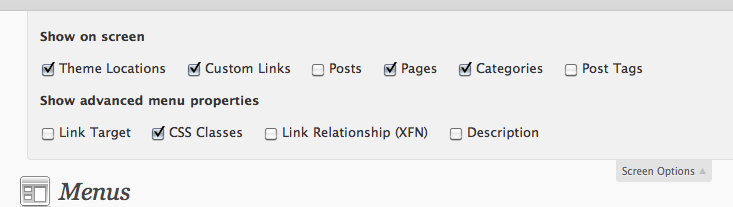
- Click on the “Screen Options” tab at the top right of the admin panel when on the Menu admin page (Appearance > Menus).
- Select “CSS Classes” under “Show advanced menu properties”. (Also there are options to add a link target, description, and a link relationship).
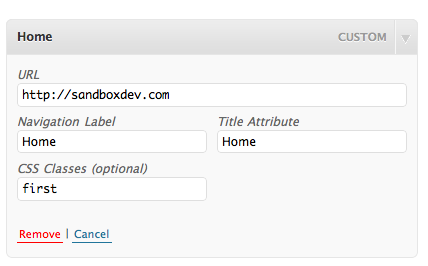
- Edit your menu items and now notice there is a spot to add a class for each individual item.
This is a great way to add a “first” or “last” or anything else you want to add on certain items.
Why not just use the IDs?
I specifically did this because I was using multiple menus (same menu class) and instead of using the list item IDs to add custom CSS for multiple IDs – I simplified it by adding a “first” class that would then cover all my menus.
ShareThis Button Cut Off Fix
I have seen a lot of sites using the ShareThis button (including a few of mine) where the button in Safari was getting cut off (clipped) at the bottom. If this is happening to you – there is a quickfix. Add this line of CSS to your stylesheet and your button will no longer be cut off.
.stbutton {display:block;height:16px;}
Site Optimization
I have been busy the past three months working on a site optimization project for a startup company where the code had been written by 10+ programmers who had come and gone over the last year. That left a big site with lots of unused and crazy CSS, images, javascript, and nasty HTML structure. I approached this project with two stages in mind:
- Start clean with CSS and XHTML. The first thing I did was unlink the main 5 thousand line CSS file along with a handful of others which was wreaking all kinds of havoc. I then went into every view, standardized the overall HTML structure (so it could hold it’s own without any CSS), and then only added in the CSS that was used.
- Maximize HTTP requests. The next phase will involve spriting images and pairing down and combining javascript so the number of HTTP requests goes way down.
The initial results:
Total HTTP Requests: 192
Total Size: 1353141 bytes
After the first stage (finished today), the general results:
Total HTTP Requests: 67
Total Size: 693064 bytes
After stage two is completed – I think I can get those numbers down by another half.
From Yahoo!:
“80% of the end-user response time is spent on the front-end. Most of this time is tied up in downloading all the components in the page: images, stylesheets, scripts, Flash, etc. Reducing the number of components in turn reduces the number of HTTP requests required to render the page. This is the key to faster pages.”
Why does all this matter? Think of a big, busy site. Think about the number of users – and then multiply that by the number of requests as well as the size of each page load. If you want good performance from your site – the pay off from optimizing your site will really pay off. It is pretty easy to go through your site and cleanup small things that over time will really add up. Not using a javascript you once did? Remove it from the header. Redid the site but still have a link to the old CSS “just in case”? Get rid of it! Remember, a little goes a long way.
Highlighted Navigation with WordPress
Ever wonder how to automatically highlight your tabs or navigation depending on the category, page, or post you are on? Wonder no more! To make this work, there are three bits of code you will need:
- The header code to control the body ID (and to tell us what page we are on)
- The navigation code
- The CSS to control the highlight
For this example, I will use this web site as an example.
The header code
ID;
$parent = 1;
while($parent) {
$page_query = $wpdb->get_row("SELECT post_name, post_parent FROM $wpdb->posts WHERE ID = '$current_page'");
$parent = $current_page = $page_query->post_parent;
if(!$parent)
$parent_name = $page_query->post_name;
}
?>

<body id="">
The XHTML code (navigation)
<div>
<ul>
<li><a href="/index.php">Home</a></li>
<li><a href="/blog/">SDAC Blog</a></li>
<li><a href="/web_solutions/">Web Solutions</a></li>
<li><a href="/network_solutions/">Network Solutions</a></li><li><a href="/user_interface_solutions/">User Interface Solutions</a></li>
<li><a href="/custom_solutions/">Custom Solutions</a></li>
<li><a href="/search/">Search</a></li>
</ul>
</div>
The CSS code
#home #nav-home, #about_us #nav-home, #contactus #nav-home, #faqs #nav-home,
#disclaimer #nav-home, #search #nav-search,
#blog #nav-blog, #web_solutions #nav-websolutions, #network_solutions #nav-networksolutions,
#user_interface_solutions #nav-userinterfacesolutions,
#custom_solutions #nav-customsolutions, #tos #nav-home, #sitemap #nav-home {
	  background:url("images/tabs/active_tab_bg.gif") repeat-x;
      border-right:1px solid #676e78;
      }

#tabs li:hover, #tabs li:hover a {
	background: url("images/tabs/active_tab_bg.gif") repeat-x;
    color:#212933;
    }
General information
When you view the code for a page, you will notice that the header code will find out if the page viewed is infact a page. If it is a page, it gets the page parent (I use parent and child pages in my web site organization). The tabs are created with unique li IDs. So that a combination of #home (the body ID) and the #nav-home (li ID) will show as a highlighted tab. With this example, this case will only occur when we are on the home page because #home is a page (the home page) so the home tab will be highlighted. When we click on “SDAC Blog”, the body ID will then be #blog, so now the #blog #nav-blog combination will force the “SDAC Blog” tab to be highlighted. Take a look at the CSS to see where to define the “cases”.
Hopefully this took some of the mystery out of working with WordPress, navigation, and how to put everything together.
Good CSS Practices
I was recently asked to recommend and comment on some good CSS practices for a client and I thought I would pass some of them.
- Use a table of contents. I always start my stylesheet(s) with a table of contents so I can easily locate particular styles in the future. I would recommend breaking your stylesheet into a few main areas like: header, main content, navigation, footer. The more sections you put in, the easier it is to read and edit at a later date.
- Use a table of contents. If you notice your stylesheet is getting out of control (over 1,000 lines) consider using multiple style sheets. You could have one master style sheet, another for forms, another for specific pages, etc. You would then either link to a stylesheet that would have links to all the styleheets using
@importor you could call in the stylesheets on a page by page basis statically or dynamically. - Start with a known, debugged code if possible. I have a library of layouts that I use when beginning a new project that I know work in multiple platforms on multiple browsers. I will be publishing these as soon as I have some free time.
- Do not rely on CSS hacks, unless it is a last resort. Believe it or not, most things can be done with CSS code that will validate. As soon as you rely on hacks, your code becomes unpredictable with new browser releases. Stick to valid code that you know will work with past and future builds of browsers. There are a lot of hacks out there which seem like a quick and easy fix, but you will pay for it down the road.
I hope this helps! CSS is a little tricky and sometimes very frustrating, but in the end…clean code is very rewarding.